Appointment reminder text examples you can copy
Reminders for the day before and two hours before, confirmation requests, reschedules, review requests and win-backs — plus versions for nails, lashes, barbers, clinics, fitness and auto service. Paste them into Altegio and it fills in the details.
Reminder templates for every step of a booking
The words in percent signs are Altegio variables. In Altegio, open Notifications → Notification types, paste the text into the Povidomlyaka template and insert each variable with “+ Add variable”. Altegio fills them in for every booking: %CLIENT_NAME% is the client's name, %DATE% and %HOURMINUTES% are the date and time, %MASTER_NAME% is the specialist, %SERVICE_TITLE% is the service, %COMPANY_ADDRESS% and %MAPS_URL% are your address and map, %LINK% is the booking details, %REVIEW_LINK% is the review form and %BOOKING_LINK% is online booking.
24 hours before
Hi %CLIENT_NAME%, just a reminder: your %SERVICE_TITLE% with %MASTER_NAME% is tomorrow at %HOURMINUTES%. See you at %COMPANY_ADDRESS%
Hi %CLIENT_NAME%, %MASTER_NAME% is looking forward to seeing you tomorrow, %DATE%, at %HOURMINUTES%. If your plans have changed, just reply and we'll find another time.
Hi %CLIENT_NAME%, your visit is tomorrow at %HOURMINUTES% and %MASTER_NAME% will have everything ready. We're at %COMPANY_ADDRESS%. See you soon.
2 hours before
Hi %CLIENT_NAME%, see you today at %HOURMINUTES%. We're at %COMPANY_ADDRESS%.
Hi %CLIENT_NAME%, two hours to go — %MASTER_NAME% will see you at %HOURMINUTES%. Directions: %MAPS_URL%
Confirmation request
Hi %CLIENT_NAME%, you're booked with %MASTER_NAME% on %DATE% at %HOURMINUTES%. Can you confirm? Just reply yes or no.
Hi %CLIENT_NAME%, are we still on for %DATE% at %HOURMINUTES%? Reply in your own words and we'll confirm, move or cancel it for you.
Booking confirmation
Thanks for booking, %CLIENT_NAME%. We'll see you on %DATE% at %HOURMINUTES% with %MASTER_NAME% at %COMPANY_ADDRESS%. We'll send a reminder the day before.
You're booked: %DATETIME%, %SERVICE_TITLE% with %MASTER_NAME%. Need to change or cancel? %LINK%
Reschedule and cancel
Hi %CLIENT_NAME%, your appointment is now on %DATE% at %HOURMINUTES% with %MASTER_NAME%. See you then.
Hi %CLIENT_NAME%, your appointment on %DATE% has been cancelled. Whenever you're ready, pick a new time here: %BOOKING_LINK%
Review request after the visit
Thanks for coming in today, %CLIENT_NAME%. We'd love to hear how your visit with %MASTER_NAME% went: %REVIEW_LINK%
Hi %CLIENT_NAME%, how do you like the result? Sharing your thoughts takes a minute: %REVIEW_LINK%
Win-back
Hi %CLIENT_NAME%, we haven't seen you in a while. %MASTER_NAME% has a few openings this week — book here: %BOOKING_LINK%
Hi %CLIENT_NAME%, it's been a few weeks since your last visit — a good time for a refresh. Pick a day that suits you: %BOOKING_LINK%
Salon, nail, lash, barber, clinic and more
A detail that fits the service turns a reminder from a formality into something useful. The variables are the same — Altegio fills them in for each booking.
Nails
Hi %CLIENT_NAME%, a reminder about your nail appointment with %MASTER_NAME% tomorrow at %HOURMINUTES%. Have a design in mind? Reply with a photo.
Hi %CLIENT_NAME%, it's been three weeks since your last set — time for an infill. Book your next visit: %BOOKING_LINK%
Lashes and brows
Hi %CLIENT_NAME%, your lash appointment with %MASTER_NAME% is tomorrow at %HOURMINUTES%. Please come without eye makeup so we can get started right away.
Hi %CLIENT_NAME%, your lash fill is coming up. Book with %MASTER_NAME% here: %BOOKING_LINK%
Hair and barber
Hi %CLIENT_NAME%, your cut with %MASTER_NAME% is today at %HOURMINUTES%. See you at %COMPANY_ADDRESS%.
Hi %CLIENT_NAME%, it's been a month since your last cut. %MASTER_NAME% has time this week: %BOOKING_LINK%
Clinic and dental
Hi %CLIENT_NAME%, a reminder of your appointment with %MASTER_NAME% on %DATE% at %HOURMINUTES%. Please bring your ID and any recent test results.
Hi %CLIENT_NAME%, you're booked with %MASTER_NAME% on %DATE% at %HOURMINUTES%. Please confirm by replying yes or no.
Fitness and classes
Hi %CLIENT_NAME%, your class with %MASTER_NAME% starts today at %HOURMINUTES%. Don't forget water and comfy shoes.
Hi %CLIENT_NAME%, we've missed you in class. This week's schedule and booking: %BOOKING_LINK%
Auto service
Hi %CLIENT_NAME%, we're expecting your car tomorrow at %HOURMINUTES% at %COMPANY_ADDRESS%. Running late or need another day? Just reply.
Hi %CLIENT_NAME%, our records show your car is due for its regular service. Pick a time: %BOOKING_LINK%
Writing reminders for Telegram, WhatsApp and SMS
The same text looks different in a messenger and in an SMS, so keep it short and put the key details in the first sentence.
- Length matters less, but 2–3 sentences read better than a paragraph
- Map and booking links open with one tap
- Clients reply right in the chat — handy for confirmations
- Open with the client's name so it doesn't read like a mass message
- Put the date and time in the first sentence so they show in the notification
- The client's reply lands in the same chat
- One SMS segment holds 160 Latin characters, or only 70 in Cyrillic and with emoji
- Keep only the essentials: name, date, time, address
- Skip long links — they eat up characters

How to write a reminder people actually answer
A few simple rules that work for any salon or service business.
- Send two reminders: 24 hours before so clients can reschedule, and 2 hours before so they don't forget
- Keep it short: name, date, time, specialist and address are all you need
- Always say how to cancel or reschedule — you'll hear about changes early, not at the door
- Use the client's name and sign off with your business name
- Don't send reminders late at night or early in the morning
- Skip ALL CAPS and exclamation marks — a calm tone builds more trust
- Don't reuse %POSITION_TITLE% from Altegio's default text — it stays empty unless the specialist's position is filled in. %COMPANY_ADDRESS% and %CONTACT_PHONE% need Location → Contacts filled in Altegio
How to send these texts automatically
Paste the text into Altegio
In Altegio, open Notifications → Notification types and paste your text into the reminder, confirmation or review notification, inside the Povidomlyaka template. The variables on this page are already in Altegio format.
Connect Povidomlyaka
Install the app from the Altegio marketplace and scan a QR code for WhatsApp and Telegram — about 5 minutes.
Reminders go out on their own
Povidomlyaka delivers your texts over Telegram → WhatsApp → SMS, and AI confirmation understands the client's reply and confirms or cancels the booking in Altegio.
Your texts stay in Altegio templates
Reminder texts are edited where you're used to — in Altegio's notification templates. Povidomlyaka doesn't rewrite them, it delivers them to the messenger your client reads.
Under Delivery channels, choose "SMS + Messengers – Always send" so reminders go out through Povidomlyaka.
How to set up notifications →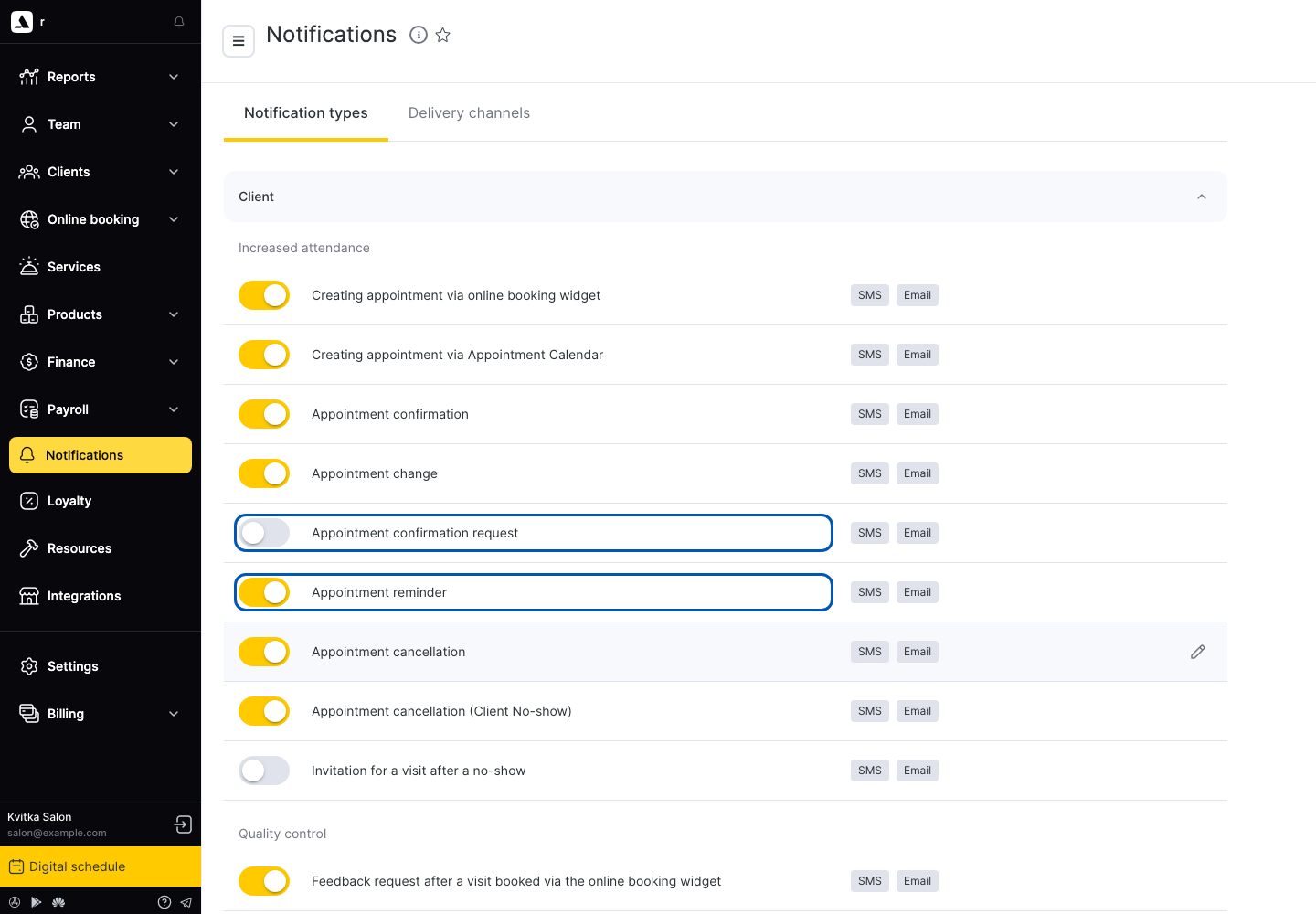
Frequently asked questions
When should I send an appointment reminder?+
Two reminders work best: one 24 hours before, so the client has time to reschedule, and one 2 hours before, so they don't forget on the day. For early-morning appointments, send the second one the evening before.
What should an appointment reminder text say?+
Keep it short and specific: the client's name, date, time, specialist and address, plus one line on how to reschedule or cancel. Long texts with promotions get read less.
How do I write a salon appointment reminder?+
Add a detail that fits the service: invite the client to send a design photo before a nail appointment, or ask them to come without eye makeup for lashes. You'll find ready versions in the industry section above.
Can I ask clients to reply yes or no?+
Yes, it's the simplest way to confirm a visit. With Povidomlyaka's AI confirmation, clients can also reply in their own words — the bot understands the answer and confirms or cancels the booking in Altegio.
Which Altegio variables can I use in reminders?+
Appointment notifications support the client's name (%CLIENT_NAME%), date and time (%DATE%, %HOURMINUTES%, %DATETIME%), specialist (%MASTER_NAME%), services (%SERVICE_TITLE%), your business name and address (%SALON_TITLE%, %COMPANY_ADDRESS%, %MAPS_URL%) and links (%LINK%, %REVIEW_LINK%, %BOOKING_LINK%). Insert them with “+ Add variable” and leave a space around each. Birthday and discount notifications only support client, company and discount variables.
Where do I edit reminder texts in Povidomlyaka?+
For Altegio, texts are edited in Altegio's notification templates, and Povidomlyaka delivers them over Telegram, WhatsApp or SMS. There's nothing to copy over separately.
What if a client doesn't use Telegram or WhatsApp?+
The cascade takes care of it: if the client isn't reachable on the first channel, the reminder moves to the next one, and as a last resort goes out as an SMS from your own Android phone.
Let reminders send themselves
Connecting Altegio takes about 5 minutes. First 14 days free, no card required.
Start free