
WhatsApp and Telegram in Planfix: chats in tasks, notifications to clients
Client messages become Planfix tasks, your team replies right from the task, and Planfix scenarios send clients notifications in their messenger. Setup takes about 5 minutes, no developer needed.

The client conversation, right inside a Planfix task
A new WhatsApp or Telegram message creates a Planfix task named “Client name (WhatsApp, Povidomlyaka, phone number)” with the whole conversation in it.
A team member writes a comment on the task, and the client gets the reply in the same messenger, from your business number. The history stays in Planfix, not on someone's phone.
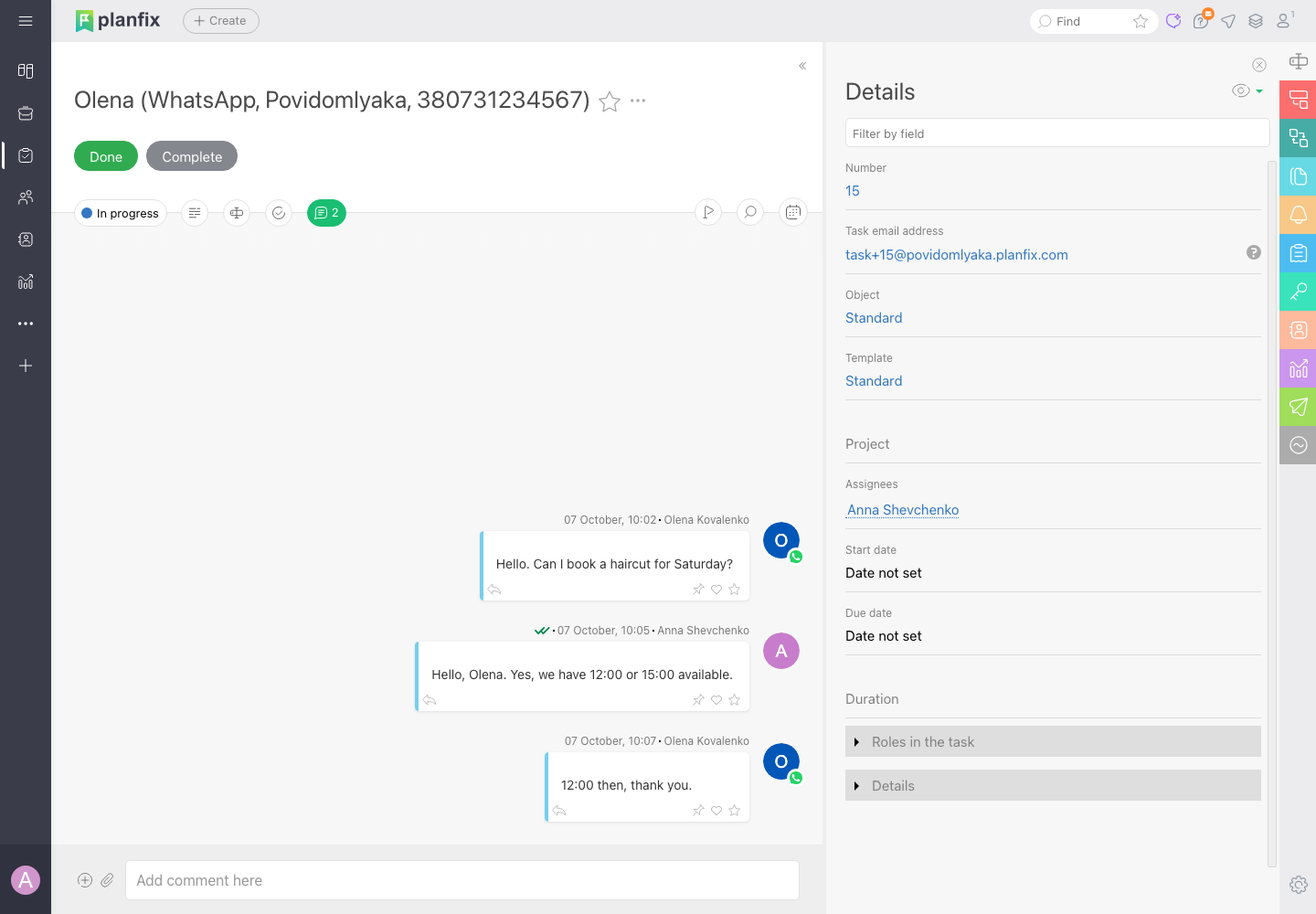
Chats, replies and notifications — from Planfix

Conversation = task
Every client conversation becomes a Planfix task with the complete message history.
Reply from Planfix
A task comment is delivered to the client in WhatsApp or Telegram — no switching between apps.

Notifications from scenarios
Planfix automation scenarios send clients messages — status updates, reminders, confirmations.

Up-to-date contacts
Client contact details in Planfix are updated from the messengers automatically.

You choose what to sync
A task per connected number, group chats, contact updates and a number blacklist.

Don't use Planfix?
Tell us — we'll let you know whether we can already connect your system.
Povidomlyaka is listed among Planfix's own integration services
The Povidomlyaka card sits in Planfix next to other providers: Account management → Integrations → Messengers → WhatsApp or Telegram → Integration via third-party services.
The connection uses Planfix's standard mechanism: you exchange an address and keys between Planfix and your Povidomlyaka account, and that's it.
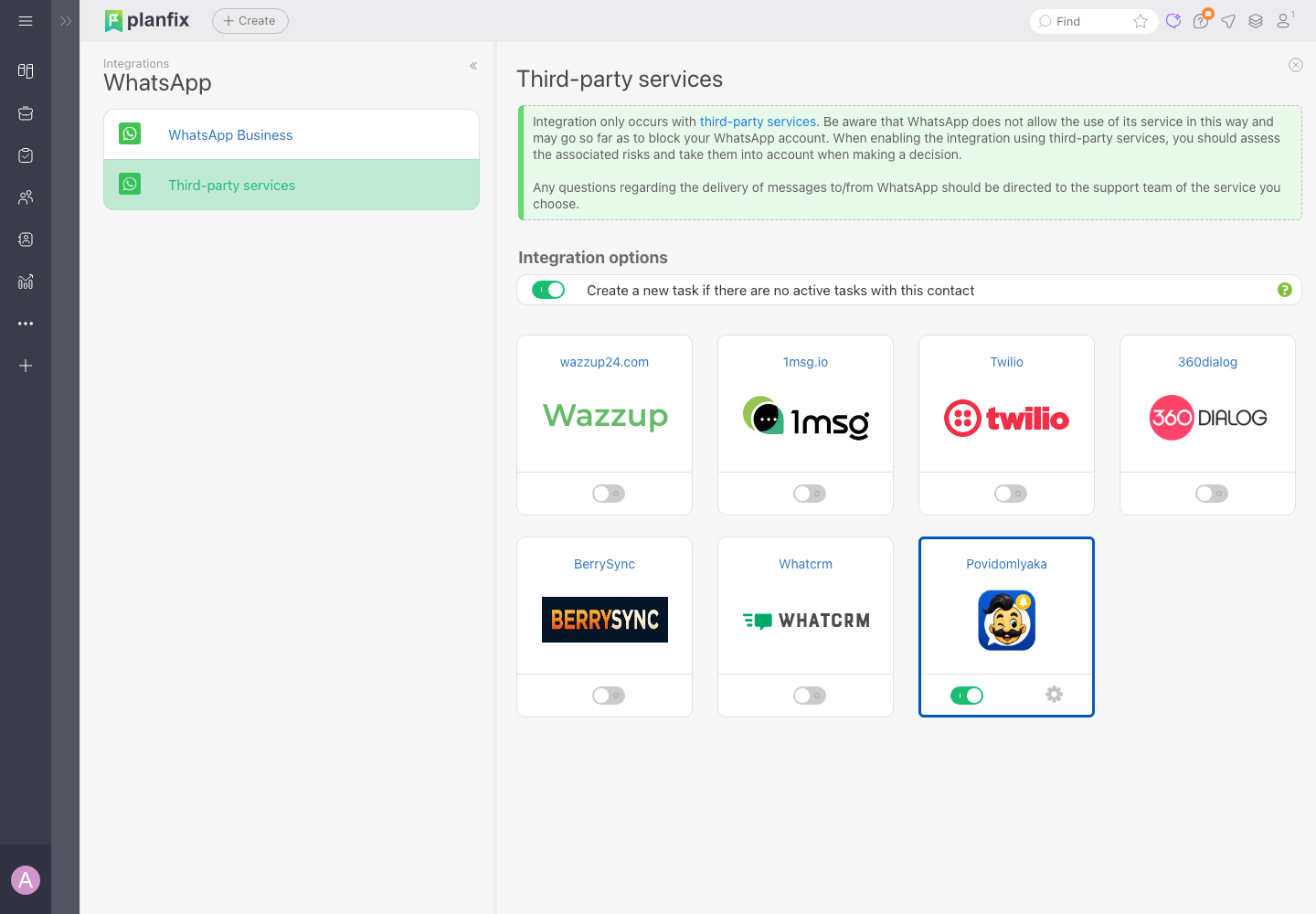
Five steps, about 5 minutes
Connect a messenger in Povidomlyaka
WhatsApp or Telegram, by QR code — like WhatsApp Web. Or both.
Open the Povidomlyaka card in Planfix
Account management → Integrations → Messengers → third-party services → the gear on the card.
Copy the address and key
Copy the request address and key from Planfix and paste them in Povidomlyaka: Integrations → Planfix.
Send a key back to Planfix
Paste the key from your account into Planfix, add the number under “Connected numbers” and save.
Choose what to sync
Chats by task, group chats, contact updates, a blacklist — whatever you need.
Step-by-step guide with screenshots
Every field, every button and the common errors are in the help center, along with how to send notifications from Planfix scenarios.
If something doesn't work, message us in chat and we'll connect it together.
Open the connection guide →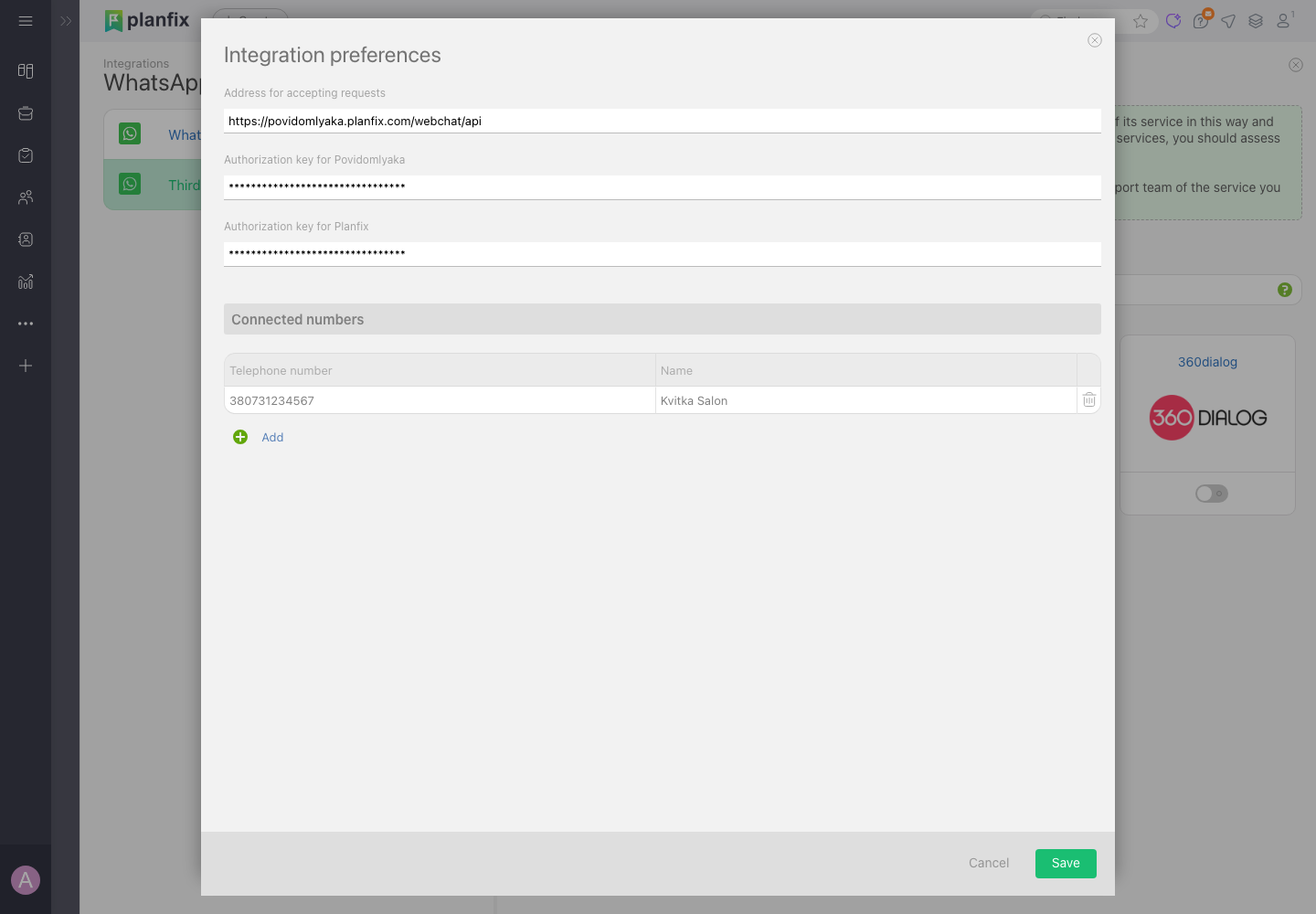
What it costs
The first 14 days are free, no card required. After that — €15.00 a month for WhatsApp or Telegram, €25.00 for both. You pay per channel, not per message or per staff member.
See pricing
Implementing Planfix for clients?
Add WhatsApp and Telegram to your projects: connect your clients to Povidomlyaka and earn up to 50% of every payment they make.
Your rate is 25%, 40% or 50% depending on how many active clients you refer, paid out by card, invoice or crypto.
Partners get a free account for their own projects and access to client accounts to set everything up for them.
Become a partnerFrequently asked questions
Where do client messages end up?+
In Planfix. Each conversation becomes a separate task with a complete message history, and the team replies to the client directly from Planfix — the client receives the answer in their own messenger.
Can I send clients notifications from Planfix?+
Yes. Planfix automation scenarios for contacts compose the text, and Povidomlyaka delivers it to the client in WhatsApp or Telegram.
Which channels can be connected?+
WhatsApp and Telegram — either one or both. SMS from Planfix isn't available yet.
Are leads and deals created?+
Povidomlyaka creates a Planfix task for each conversation and keeps contacts up to date. Leads and deals from those tasks are set up with Planfix scenarios, the same as for any other source.
Do I need a developer to set this up?+
No. You connect it yourself in about 5 minutes with the step-by-step guide. If something doesn't work, message us in chat and we'll connect it together.
Is this the official WhatsApp Business API?+
No. WhatsApp connects by QR code, like WhatsApp Web, to your regular number — no template moderation and no per-message fees.
How is this different from the Altegio integration?+
The Altegio integration reads bookings and sends reminders and review requests. The Planfix integration brings client chats into Planfix tasks and delivers notifications from Planfix scenarios.
Connect WhatsApp and Telegram to Planfix
About 5 minutes to connect. The first 14 days are free, no card required.
Start free